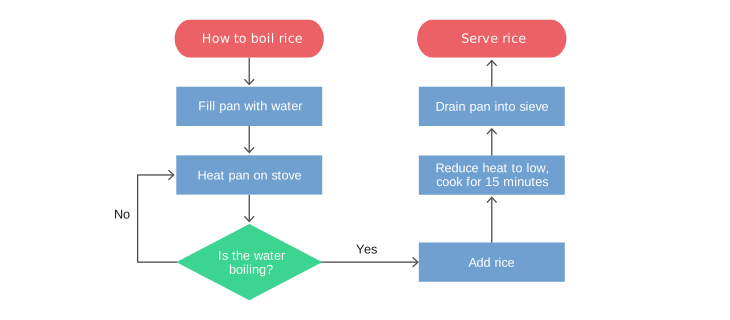
Control flow is the order in which statements and instructions are executed in a program
Control flow can be affected by decision-making statements, loops, and function calls.
Indentation in Python
Code blocks are a group of statements that are executed together.
In Python, indentation is used to define blocks of code.
Python uses whitespaces (spaces or tabs) at the beginning of a line to determine the indentation level of the line.
The amount of indentation is flexible, but it must be consistent throughout that block.
Generally, four spaces are used for each level of indentation.
Example:
ifTrue:print("This is within the if block") # Indented with four spacesifTrue:print("This is within the nested if block") # Indented with eight spacesprint("This is outside the if block") # No indentation
Conditional Flow Control
graph TD;
    A{Condition 1?} -->|Yes| B[Block 1: Action if Condition 1 is true]
    A -->|No| C{Condition 2?}
    C -->|Yes| D[Block 2: Action if Condition 2 is true]
    C -->|No| E[Block 3: Action if both are false]
if-statement
The if statement is used for decision-making in Python programming. It tests a condition and executes a block of code only if that condition evaluates to True. If the condition is False, the block of code is skipped.
if expression:
    statement(s)
if-else-statement
The if statement can be combined with elif and else clauses to control the flow of execution in the program, allowing for the implementation of more complex logical structures.
if condition1:# Code to execute if condition1 is True (Execute Block1)elif condition2:# Code to execute if condition2 is True (Execute Block2)else:# Code to execute if no conditions are True (Execute Block3)
Example : Age Category
Objective: Categorize life stages by age.
age =20if age <13:print("Child")elif age <20:print("Teenager")else:print("Adult")
Adult
Loops in Python
graph TB;
    A[Start Loop<br/>for item in iterable:] --> B[Execute Block]
    B --> A
    A -->|No More Items| C[End Loop]
Loops in Python are used to execute a block of code repeatedly. Python provides two types of loops: for and while.
for Loops
A for loop is used to iterate over a sequence (e.g., a list, tuple, string, or range) and execute a block of code for each item in the sequence.
for element in sequence:
    statement(s)
Example 1
forchrin"HELLO":print(chr)
H
E
L
L
O
Example 2
for fruit in ["Apple", "Orange", "Banana"]:print(fruit)
Apple
Orange
Banana
Example 3
for i inrange(10):print(i)
0
1
2
3
4
5
6
7
8
9
while Loops
A while loop, on the other hand, continues to execute a block of code as long as a given condition evaluates to True.
while condition:
    statement(s)
Example
index =0fruits = ["Apple", "Orange", "Banana"]while index <2:print(index, fruits[index]) index +=1
0 Apple
1 Orange
Controlling Loop Execution
break: Immediately exits a loop.
for i inrange(10):if i ==5:breakprint(i)
0
1
2
3
4
continue: Skips the remainder of the loop’s body and immediately proceeds with the next iteration.
for i inrange(10):if i %2==0:continueprint(i)
1
3
5
7
9
pass: Acts as a placeholder, allowing for the definition of empty control structures.
for i inrange(10):pass
Python List Comprehensions
List Comprehensions in Python are a concise and efficient way to create lists. They allow for the construction of a new list by applying an expression to each item in an iterable, optionally filtering items to include only those that meet a condition.
Syntax
The basic syntax of a list comprehension is:
[expression for item in iterable if condition]
where:
expression is valid expression that depends on the current item in the iteration.
item is the variable that takes the value of the item inside the iterable in each iteration.
iterable is a sequence, collection, or an object that can be iterated over.
condition is an optional part. If specified, the expression will only be applied to items that meet the condition.
List Comprehensions - Example 1
squares = [x**2for x inrange(10)]squares
[0, 1, 4, 9, 16, 25, 36, 49, 64, 81]
Explanation:
range(10): Produces a sequence of numbers: 0, 1, 2, …, 9.
x**2 : Computes the square of each number x from the sequence.
List Comprehension:
Combines iteration and computation in a single, concise expression
Iterates over each number in range(10) and applies the square operation, generating a new list.
List Comprehensions - Example 2
squares_even = [x**2for x inrange(1, 11) if x %2==0]squares_even
[4, 16, 36, 64, 100]
Explanation:
range(1, 11): Generates numbers from 1 to 10 (inclusive).
if x % 2 == 0: Filters the numbers to include only even values.
x**2: Computes the square of each even number.
List Comprehension:
Combines iteration, filtering, and computation into a concise expression.
Iterates through each number in the range, checks if it is even, and if so, squares it.
Error Handling in Python
Error handling is a critical aspect of writing robust Python programs. Python provides the try and except blocks to catch and handle exceptions, preventing the program from terminating unexpectedly.
Handling Division by Zero
A common error in programming is division by zero, which occurs when a number is divided by zero. Python raises a ZeroDivisionError exception in such cases.
Syntax
The basic syntax for handling exceptions in Python is:
numerator =10denominator =0try:# Code block where exception can occur result = numerator / denominatorexceptZeroDivisionError:# Code to execute if there is a ZeroDivisionErrorprint("Cannot divide by zero!")
Cannot divide by zero!
Exercise: Factorial Calculation
Write a Python program that calculates the factorial of a given number \(n\).
The factorial of a non-negative integer \(n\) is the product of all positive integers less than or equal to \(n\).
It is denoted by \(n!\) and defined as: \[
n! = n \times (n-1) \times (n-2) \times \ldots \times 1
\]
For example, \(5! = 5 \times 4 \times 3 \times 2 \times 1 = 120\).
Solution: Factorial Calculation
# Set the number to calculate the factorialn =5# Initialize the resultresult =1# Loop to calculate the factorialfor i inrange(1, n +1): result *= i# Print the resultprint(f"Factorial of {n} is {result}")
Factorial of 5 is 120
Explanation:
Setting the Number:n = 5 sets the number for which we want to calculate the factorial.
Initialization:result = 1 initializes the result variable to 1.
Loop for Calculation: The for loop for i in range(1, n + 1): iterates from 1 to n, multiplying the result by each integer i in the range.
Printing the Result:print(f"Factorial of {n} is {result}") prints the calculated factorial.
Exercise: Fibonacci Sequence
Write a Python program that generates the first 20 numbers in the Fibonacci sequence.
The Fibonacci sequence is a sequence of numbers where each number is the sum of the two preceding numbers.
The first two numbers in the sequence are 0 and 1.
# Initialize the first two numbersa =0b =1# Print the first two numbersprint(a, end=" ")print(b, end=" ")# Generate the next 18 numbersfor _ inrange(18): next_number = a + bprint(next_number, end=" ") a = b b = next_number
Initialization:a = 0 and b = 1 set the first two numbers of the Fibonacci sequence.
Printing the Initial Numbers: The first two numbers (0 and 1) are printed using print(a, end=" ") and print(b, end=" "), ensuring that the output is on the same line with spaces separating the numbers.
Generating Additional Numbers: The for loop runs 18 times to generate the next 18 Fibonacci numbers. Within each iteration:
Calculation:next_number = a + b computes the next Fibonacci number by summing the previous two.
Printing: The new number is printed immediately with print(next_number, end=" ").
Updating Variables:a = b and b = next_number update the sequence for the next iteration.
Overall: The code prints a total of 20 Fibonacci numbers (the two initialized numbers plus 18 generated ones).
Exercise: Printing a Pattern
Write a Python program that prints a pattern of asterisks (*) in the shape of a right-angled triangle.
The height of the triangle is determined by a given number \(n\)
Each row contains a number of asterisks equal to its row number
Example output: for \(n = 5\):
*
**
***
****
*****
Solution: Printing a Pattern
# Set the height of the patternn =5# Loop to print each row of the patternfor i inrange(1, n +1):print('*'* i)
*
**
***
****
*****
Explanation:
Setting the Height: n = 5 sets the height of the pattern to 5.
Loop for Rows: The for loop for i in range(1, n + 1): iterates from 1 to n, representing each row of the pattern.
Printing Asterisks:print('*' * i) prints i asterisks on each row, where i is the current row number.